
C Programming: Complete Guide to Topics, Questions, Practice Tests
"C Programming is one of the most important programming foundations for students studying computer science, engineering, information technology and software development. Learning C is not simply about memorising syntax."
A student needs to understand how a program:
stores data;
evaluates expressions;
makes decisions;
repeats operations;
organises logic through functions;
stores collections using arrays;
represents strings;
accesses memory using pointers;
allocates memory dynamically;
organises data using structures;
reads and writes files; and
behaves when memory or program logic is used incorrectly.
Strong C Programming skills can also help students understand concepts that appear later in:
C++;
Java;
Python;
Data Structures;
Operating Systems;
Embedded Systems;
Computer Networks;
Compiler Design; and
Systems Programming.
What is C Programming?
C is a general-purpose procedural programming language used to write programs ranging from small utilities to systems and embedded software.
A C program typically contains:
preprocessing directives;
functions;
variables;
expressions;
statements; and
control structures.
printf("Hello, World!\n");
return 0;
}
Output:Hello, World!
| #include <stdio.h> | Includes declarations for standard input/output facilities such as printf(). |
| int main(void) | Defines the main function where execution of a hosted C program begins. |
| printf() | Displays formatted output. |
| return 0; | Returns a successful termination status from main(). |
Why Learn C Programming?
C is useful not only because of the programs you can write with it, but also because of the programming concepts it forces you to understand.
1. Strong Programming Foundation
C helps learners understand fundamental programming concepts such as:
- Variables: A variable is the name given to a memory location in a program.
- Data Types: Define the type of data a variable can hold, such as integers, characters, floating-point numbers, and more.
- Expressions: Combinations of variables, constants, and operators that produce a value.
- Operators: Symbols used to perform operations such as arithmetic, comparison, assignment, and logical operations.
- Decision-Making: Allows a program to choose different actions based on conditions using statements such as
if,else, andswitch. - Iteration: Repeats a set of instructions using loops such as
for,while, anddo-while. - Functions: Reusable blocks of code designed to perform a specific task, making programs easier to organize and maintain.
- Arrays: Collections of elements of the same data type stored under a single name, useful for handling multiple values efficiently.
- Program Decomposition: The process of breaking a complex program into smaller, manageable functions or modules for easier development and debugging.
2. Understanding Memory
Pointers are one of the defining aspects of C. Through pointers, students begin to understand:
- Addresses: Pointers store the memory address of another variable, helping programs locate data in memory.
- Memory Access: Pointers allow a program to access or modify data directly through its memory address.
- Array Representation: In C, pointers are closely related to arrays and can be used to access array elements efficiently.
- Pass-by-Value: C passes arguments by value, but pointers can be used to modify the original data by passing its address to a function.
- Indirect Modification: A pointer allows a program to change the value of a variable indirectly by accessing it through its address.
- Dynamic Allocation: Pointers are essential for dynamically allocating and managing memory during program execution using functions such as
malloc()andfree(). - Memory Ownership: Helps programmers understand which part of a program is responsible for managing allocated memory and releasing it when it is no longer needed.
3. Data Structures
Many Data Structures courses use C or C++.
| Linked List | A collection of nodes where each node contains data and a pointer/reference to the next node. Unlike arrays, elements do not need to be stored next to each other in memory. |
| Stack | A linear structure that follows LIFO (Last In, First Out). The last element added is the first one removed. Think of a stack of plates. |
| Queue | A linear structure that follows FIFO (First In, First Out). The first element added is the first one removed, like people waiting in a line. |
| Tree | A hierarchical structure consisting of nodes connected by edges. It starts with a root and can have child nodes. A binary tree has at most two children per node. |
| Graph | A collection of vertices (nodes) connected by edges. Graphs are useful for representing networks such as roads, social connections, and computer networks. |
| Dynamic Array | An array that can automatically grow or shrink when its size changes. In C++, vector is a common example. |
4. Operating Systems and Systems Programming
C has historically been closely associated with systems software. Learning C can therefore help students understand concepts related to:
| Topic | Brief Explanation |
|---|---|
| Processes | A process is a running program. C helps you understand how programs are started, executed, and managed by the operating system. |
| Memory | C provides direct access to memory using pointers. Students learn about memory addresses, stack, heap, and how memory is allocated and released. |
| System Calls | System calls allow a program to request services from the operating system, such as creating processes, reading files, or allocating resources. |
| Files | C provides functions for creating, opening, reading, writing, and closing files, helping students understand how data is stored and accessed. |
| Device Interaction | C can interact with hardware and devices through operating-system interfaces and low-level APIs. This is important in embedded and systems programming. |
| Operating Systems | C is widely used to implement operating-system components. Learning C helps students understand concepts such as process management, memory management, and file systems. |
| Low-Level Software Behaviour | C is relatively close to the hardware, so students can see how variables, pointers, memory, and machine-level operations relate to what the computer actually does. |
5. Embedded Systems
C is widely associated with embedded programming because it provides:
direct data representation;
bitwise operations;
predictable control structures;
pointers;
relatively low runtime overhead; and
6. Placement and Technical Interview Preparation
Programming assessments frequently evaluate a candidate's ability to:
1. understand code;
2. trace output;
3. identify bugs;
4. reason about loops;
5. work with arrays;
6. understand functions;
analyse pointers; and
solve programming problems.
How Does a C Program Work?
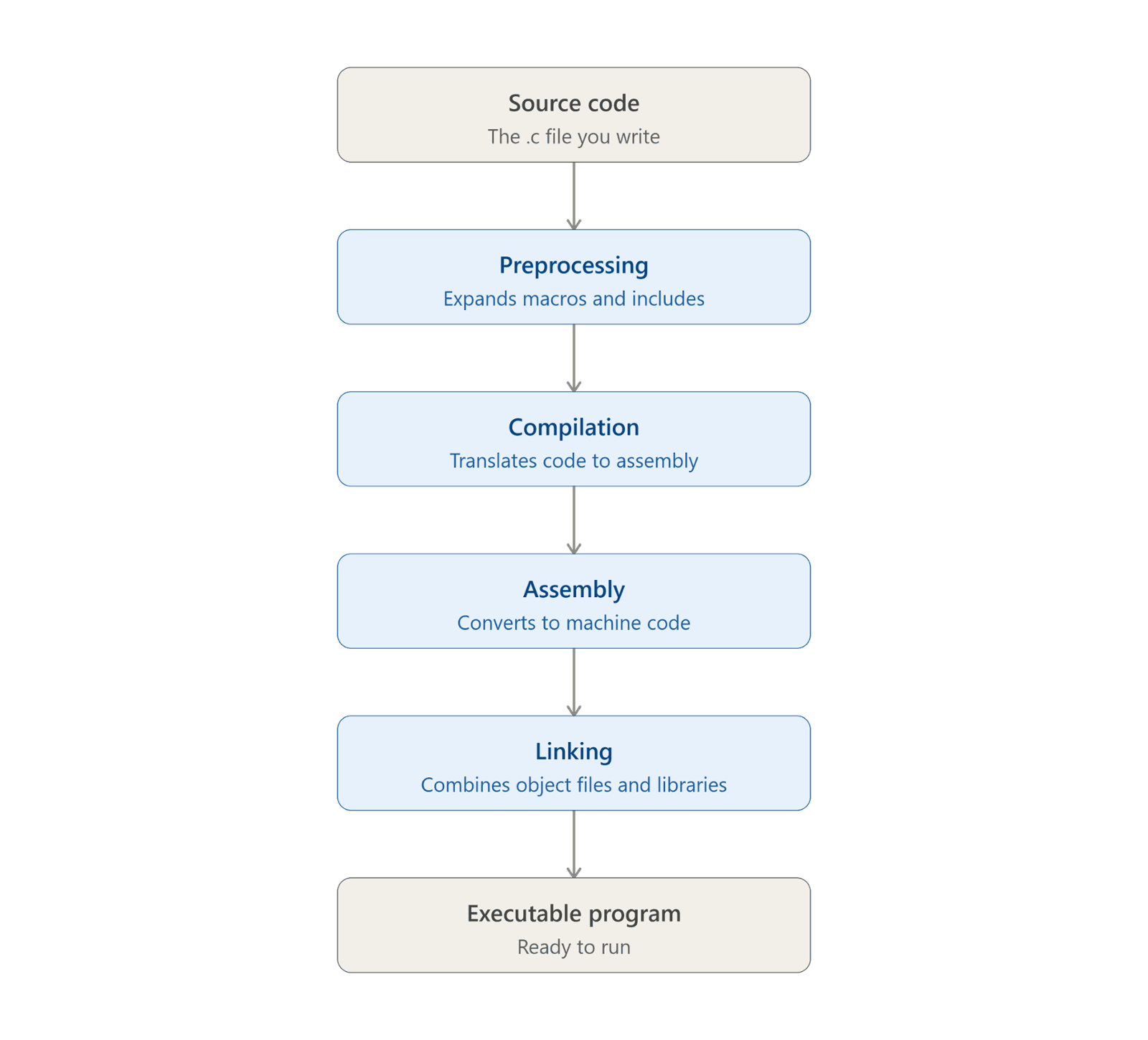
.c file using C syntax.#include statements (pulling in header file contents), replaces #define macros, and handles other directives that start with #. No actual compiling happens yet — it's just text substitution..o or .obj).printf), resolving references between them into one unified binary..exe on Windows or a binary with no extension on Linux/macOS) that you can execute directly.C Programming Syllabus
This C programming syllabus is designed to take learners from the fundamentals of C programming to advanced concepts such as pointers, dynamic memory allocation, file handling, debugging, and memory safety. The topics are arranged in a progressive order so that beginners can build their knowledge step by step.
1. C Programming Fundamentals
| Topic | What You Should Learn |
|---|---|
| Introduction to C | Purpose, features, applications, and compilation process |
| Program Structure | main(), statements, blocks, and basic syntax |
| Header Files | Standard headers and #include |
| Comments | Single-line and multi-line comments |
| Variables | Declaration, initialization, and assignment |
| Identifiers | Naming rules and keywords |
| Data Types | char, int, float, double, void |
| Type Modifiers | short, long, signed, unsigned |
| Constants | Literal and symbolic constants |
2. Input, Output, and Operators in C
Input/Output:
| Topic | What You Should Learn |
|---|---|
| Input/Output | printf(), scanf() |
| Format Specifiers | %d, %u, %c, %f, %s, etc. |
Operator:
| Topic | What You Should Learn |
|---|---|
| Arithmetic Operators | +, -, *, /, % |
| Relational Operators | ==, !=, <, >, <=, >= |
| Logical Operators | &&, ` |
| Assignment Operators | =, +=, -=, etc. |
| Increment/Decrement | ++, -- |
| Conditional Operator | ?: |
| Bitwise Operators | &, ` |
3. Control Flow and Decision Making
| Topic | What You Should Learn |
|---|---|
| if Statement | Simple conditions |
| if-else | Two-way decision making |
| Nested Conditions | Multiple decision levels |
| switch | Multi-way selection |
| for Loop | Counter-based iteration |
| while Loop | Condition-controlled iteration |
| do-while Loop | Post-tested iteration |
| break | Early loop or switch termination |
| continue | Skipping the current iteration |
4. Functions and Program Organization
| Topic | What You Should Learn |
|---|---|
| Functions | Definition and invocation |
| Function Prototypes | Declarations and type checking |
| Parameters | Passing data to functions |
| Return Values | Returning computed results |
| Scope | Local and file-scope variables |
| Storage Duration | Automatic and static objects |
| Recursion | Functions calling themselves |
5. Arrays and Strings
| Topic | What You Should Learn |
|---|---|
| Arrays | Declaration, initialization, indexing, and traversal |
| 2D Arrays | Matrices and multidimensional data |
| Strings | Null-terminated character arrays |
| String Functions | strlen(), strcmp(), strcpy(), strcat() |
6. Pointers and Memory
| Topic | What You Should Learn |
|---|---|
| Pointers | Addresses and dereferencing |
| Pointer Arithmetic | Navigating arrays with pointers |
| Arrays & Pointers | Their relationship and differences |
| Double Pointers | Pointer-to-pointer concepts |
| Function Pointers | Referencing functions through pointers |
7. Structures and User-Defined Data Types
| Topic | What You Should Learn |
|---|---|
| Structures | Grouping different types of data |
| Structure Pointers | Accessing members using -> |
| Unions | Sharing storage between members |
| Enumerations | Named integer constants |
| typedef | Creating type aliases |
8. Dynamic Memory Allocation
| Topic | What You Should Learn |
|---|---|
| Dynamic Memory | Heap allocation concepts |
| malloc() | Dynamic memory allocation |
| calloc() | Allocation with zero-initialized bytes |
| realloc() | Resizing allocated memory |
| free() | Releasing allocated memory |
9. File Handling and Preprocessor
| Topic | What You Should Learn |
|---|---|
| File Handling | Streams and files |
| File Modes | Read, write, append, and binary modes |
| File Positioning | fseek(), ftell(), rewind() |
Preprocessor and Macros
| Topic | What You Should Learn |
|---|---|
| Preprocessor | #define, conditional compilation |
| Macros | Object-like and function-like macros |
10. Error Handling, Memory Safety, and Debugging
| Topic | What You Should Learn |
|---|---|
| Error Handling | Return values, error checks, and failure handling |
| Memory Safety | Bounds errors, dangling pointers, and memory leaks |
| Undefined Behavior | Operations for which the C standard provides no defined result |
| Debugging | Finding syntax, logical, and runtime errors |
Which C Programming Topics are important for placements?
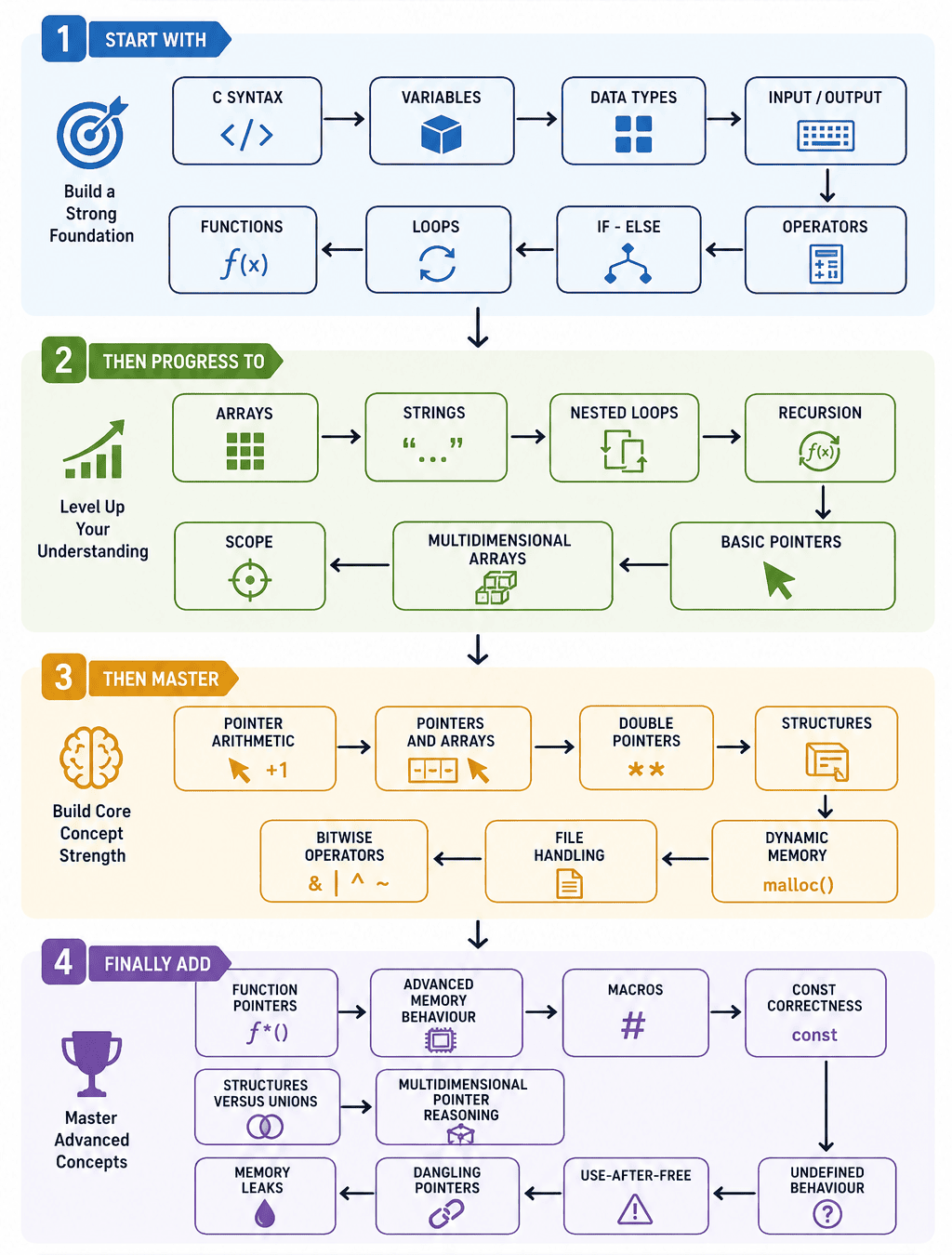
C Programming Rules and Concepts
1. Variable Declaration
int age = 20;
float salary = 25000.5f;
char grade = 'A';
Syntax:
data_type variable_name = value;
2. Important Basic Data type
| Type | Typical Purpose |
|---|---|
char | Character-sized integer data |
int | Integer values |
float | Single-precision floating-point values |
double | Double-precision floating-point values |
void | Absence of value/type in specific contexts |
3. printf() Format Specifiers
| Data Type | Common Format |
|---|---|
int | %d |
unsigned int | %u |
char | %c |
string | %s |
double with printf | %f |
| hexadecimal integer | %x |
4. Input with scanf()
Example:
int age;
scanf("%d", &age);
The & symbol acts as the "address-of" operator. "address-of" operator. Its purpose when used with scanf is to provide the exact memory location (address) of a variable. And you can change the the format specifier as per change in data type as mentioned above.
5. Integer Division
Output: 2
Both operands are integers and you are doing integer division. if floating-point division is required then use:
printf("%.2f", (double)a / b);
Output: 2.33
6. Assignment vs Equality
An Assignment operator is represented by single = sign, whereas an Equity operator is represented by double == sign. A common confusion happens when you are using inside the if statement.
For example:
if(x=10) with if(x==10)
7. Array Indexing
To declare an array we write:
int arr[5] = {1, 2, 3, 4, 5};
Syntax:
data_type array_name[size_of_array];
arr[5] => [ 1 2 3 4 5]
indexes-> 0 1 2 3 4
In C, array indexing starts from 0 because the index represents the offset from the array's first element in memory. Thus, arr[0] refers to the first element, arr[1] to the second, and so on.
8. C Strings
A C string is the sequence of characters or character array, they are terminated by '\0'.
For example:
char city[] = 'Delhi';
Here, compiler sees 'D' 'e' 'l' 'h' 'i' '\0'
when compiler sees '\0' it understands that it has reached to last character of the string.